The right offer, right on time.
Codes that open and close on your event's own clock, cover only the tickets you choose, and show you what each one sold.
Sign upIncluded on Pro and Amplify.
The right offer, right on time.
Codes that open and close on your event's own clock, cover only the tickets you choose, and show you what each one sold.
Sign upIncluded on Pro and Amplify.
What sets our codes apart
On your event's clock
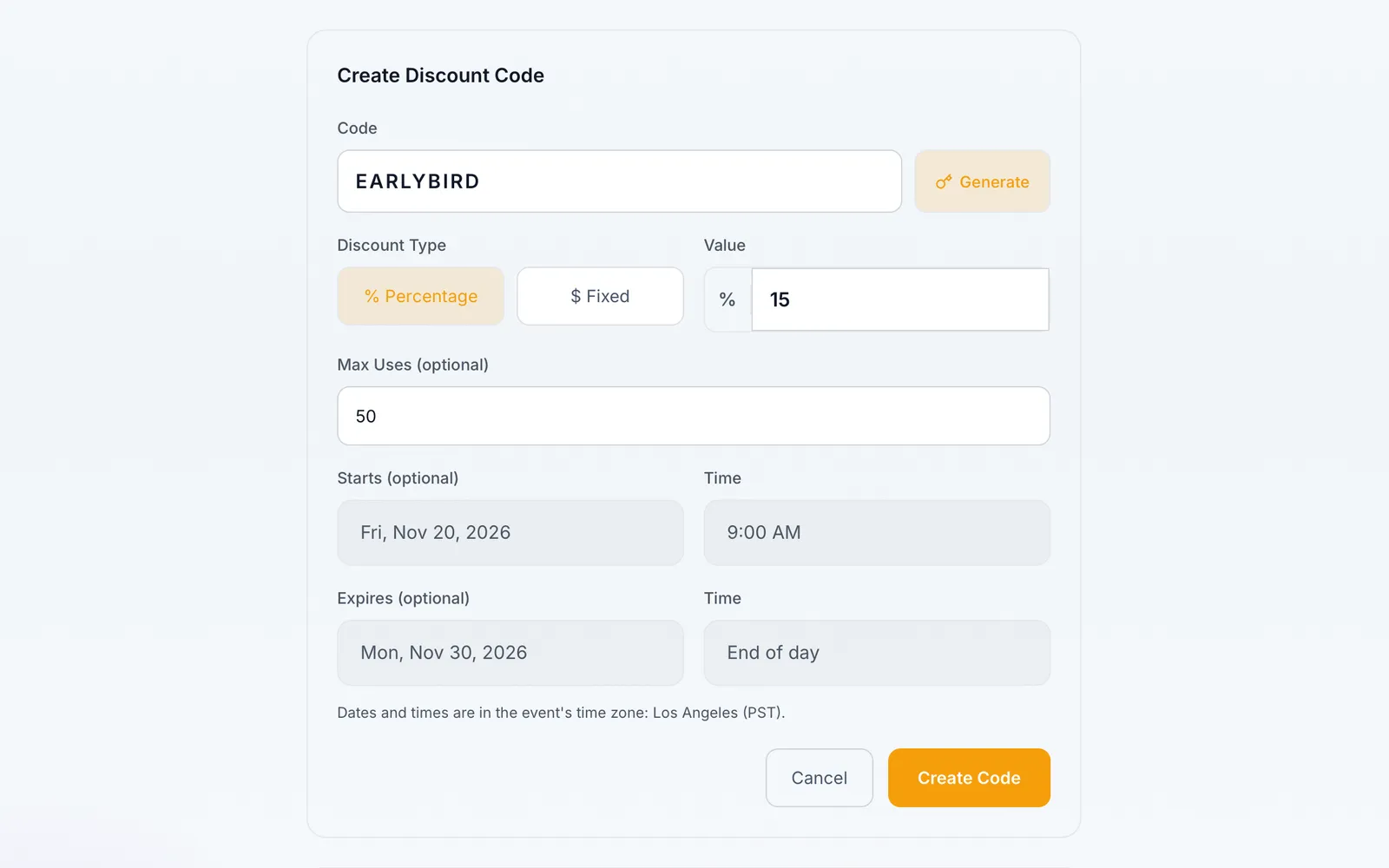
Pick a start and an end, each a date and a time, read in your event's own time zone. A code that ends on the 30th runs through the 30th where your event is.Pick a start and an end, each a date and a time, read in your event's own time zone.
Only the tickets you choose
Limit a code to chosen ticket types, cap its uses, and take a percentage or a set amount off. Every rule is checked again when the code is applied.Limit a code to chosen ticket types, cap its uses, and take a percentage or a set amount off.
An offer for their next event
Right after someone buys, show them another of your events with a discount. The code is applied for them at checkout, with nothing to type.Right after someone buys, show them another of your events with a discount.
How it works
Create your code
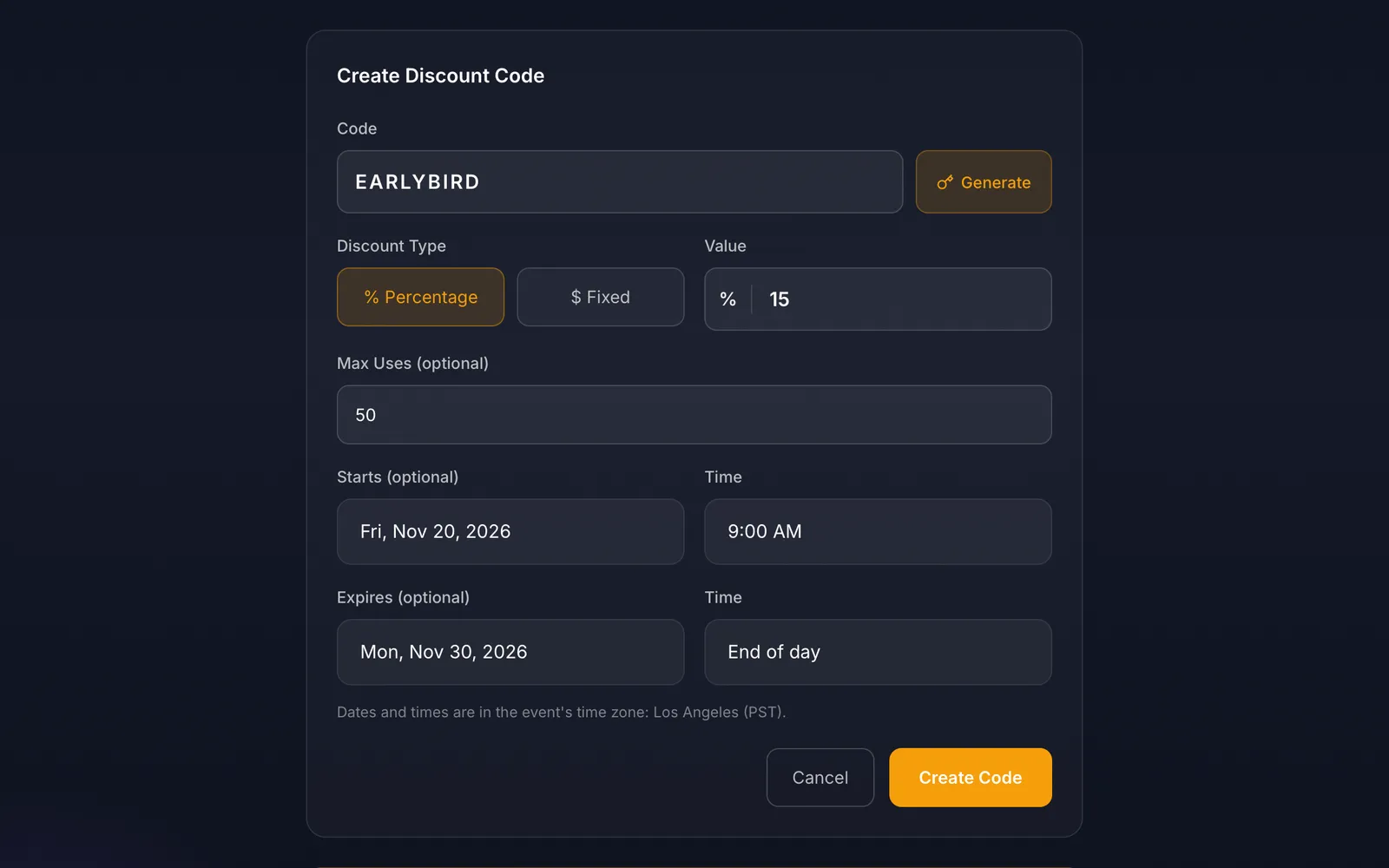
Name it, like EARLYBIRD, or generate one.
Set the rules
Choose the dates, the times, the ticket types and a use limit.
See what it sold
The Discount Usage report shows each code's uses, discounts and sales.
Loved by artists and organizers
“For nearly two decades, Akal (owner of BrightStar) has been lending his skills and talents in support of the Bhakti movement. His platform uniquely serves our movement with authenticity and heart. The technology also rocks!”

Jai UttalGrammy Nominee (Client Since 2014)
“Not only does BrightStar offer a powerful software platform that has worked very well for my events, but their client support is the best. Their communication is personal, heart-centered, and always thoughtful.”

Peter KaterTwo-Time Grammy Winner (Client Since 2014)
“We've been so happy with the outstanding customer service that we've received while working with BrightStar, and feel great about supporting a company that is authentically committed to the ideals of higher consciousness.”

Eric ForbisFounder, BuddhaFest (Client Since 2012)
Questions organizers ask
What kinds of discount codes can I create?
Percentage-off and amount-off codes. Name them however you like, such as EARLYBIRD, SANGHA or a partner's name, or generate one with a click.
Can a code start and end at a set time?
Yes. Choose a date and, if you like, a time for the start and for the end, in your event's own time zone. A date on its own covers that whole day.
Can I limit a code to certain tickets?
Yes. Pick the ticket types it applies to. Leave the list empty and it covers every ticket for the event.
Can I cap how many times a code is used?
Yes. Set a use limit, and once it is reached the code stops working. The count is checked again when a buyer applies the code.
What does a buyer see if a code has ended or not started?
Checkout tells them the code is not active yet or has expired, and their price stays as listed.
Can I offer a discount on my next event?
Yes. Add that event as an upsell with a discount. Buyers see it on their confirmation page, and the code is applied for them at checkout.
Where do I see how my codes performed?
In Reports, under Discount Usage: the uses, the discount given and the sales for each code.
Which plans include discount codes?
Discount codes are on Pro and Amplify.
Read more
A deadline that means what you said
A discount code is a promise with a deadline. If you tell your community that an early-bird offer ends on Sunday night, it should end on Sunday night where your event happens, not hours earlier on a server's clock. On BrightStar, a code's start and end are each a date and an optional time, read in the event's own time zone, and the form names that zone right beside the fields. A date with no time covers the whole day: from the first minute of the start date to the last minute of the end date. Buyers who arrive before a code opens, or after it closes, are told so plainly at checkout, and the price stays as listed.
Codes that fit the offer
Each code takes either a percentage or a set amount off. You can limit it to chosen ticket types, such as a weekend pass or a single workshop, and a buyer whose cart holds none of those tickets is told the code does not cover them instead of seeing a discount of nothing. A use limit stops a code once it has been redeemed that many times, and the count is checked again at the moment the code is applied, so a popular code cannot run past its cap. Sedona Yoga Festival, for example, runs a code limited to chosen tickets with a cap on its uses.
From one event to the next
The moments after a purchase are when people are most ready to say yes again. With upsells on Pro, your confirmation page can show another of your events with a discount attached. When the buyer follows it, the code is applied to their cart for that event only, so it can never land on the wrong order. Your next workshop, retreat or concert starts filling while the last one is still fresh.
Know what worked
Every redemption is recorded with its order. The Discount Usage report lists each code with how often it was used, how much it took off and the sales it brought in, so you can see which partner, list or moment actually moved tickets, and shape the next offer around it. Codes live with the event they belong to, alongside your tickets and orders, with nothing extra to connect.
What organizers use codes for
The same simple tool serves many purposes. An early-bird code rewards the people who commit first and gives you sales to announce. A code for your past participants thanks the people who already know your work. A code given to a partner studio or a teacher on your program lets you see what their recommendation brought. A code for volunteers or for members of your community makes a quiet reduction possible without changing the public price. A code for the last week can help a gathering that still has room. Each of these is one code with its own name, its own dates and its own limits, and each appears separately in your report.
Naming a code
A code is typed by a person, often on a phone, so make it easy. Choose one short word that is easy to say aloud and hard to mistype, and avoid characters that look alike. Codes are not case-sensitive, so a buyer who types it in small letters is not turned away. A name that says where the code came from, such as a partner’s name or the name of your newsletter, makes the Discount Usage report readable at a glance months later. If you would rather not choose, a code can be generated for you with a click.
What the buyer experiences
At checkout the buyer enters the code and sees the reduction applied to the tickets it covers before they pay. If the code has not started yet, has ended, has been used up or does not cover the tickets in the cart, checkout says which, in plain words, and the price stays as listed. Nothing fails silently. A buyer is never left wondering whether a code worked, and you are spared the email asking why it did not.
What codes do not do
It is as useful to know the edges. A code takes a percentage or a set amount off; there are no buy-one-get-one codes. A use limit counts redemptions across all buyers; there is no limit per customer and no minimum order amount. A code belongs to the event it was created for. If you need an offer that these rules cannot express, a separate ticket type with its own price, quantity and sale dates will often do it more clearly than a code.
Discounting with care
A discount is a message as well as a price. Used sparingly and with a real deadline, it rewards commitment and moves people to decide. Used constantly, it teaches your community to wait and makes your full price look like a mistake. Decide your offers before you announce the event, tell people honestly when each one ends, and let it end. For those who cannot afford the full price, a sliding scale ticket or a few scholarship places usually serve better than a public code.
Setting one up
Open the event, go to its discount codes and create a code. Give it a name, choose a percentage or an amount, and set what you need of the rest: the start, the end, the ticket types it covers and the number of uses. Save it and share it. You can create several codes for one event and run them at the same time, and you can see each one’s uses as they come in. Discount codes are part of Pro and Amplify.
Ticket Categories
Group your ticket types into clear categories, so buyers see the shape of your event and find their ticket fast.
See the feature →Smart Pricing
Get a suggested price for every ticket type, based on similar events near you, and decide for yourself.
See the feature →Assigned Seating
Buyers pick their exact seat from a clear, live map, and the seat is theirs the moment they pay.
See the feature →Embed Widget
Paste one snippet on your site and buyers choose tickets and pay right there, without being sent away.
See the feature →Waitlist
Your event page captures interest at every stage, from before tickets open to after it sells out, and follows up for you.
See the feature →Custom Questions
Add your own questions to checkout and every answer arrives tied to the right attendee, ready to export.
See the feature →See allThere is more to see.